Rooting a VMC2040 security camera part 3: Analyze the boot sequence
Brief
In this part we will go through the init script to see what (and how!) services are started during the boot.
The other parts of the series are:
Boot sequence
I've tried to summarize the boot sequence in the diagram below. Please be aware that the following descriptions are heavily simplified and only shows the logical flow. E.g. the snippets are not complete, a function could be implemented as a chain of calls and spread across multple files, etc. But the overall picture is somehow correct and should give you a good idea of how the system works.
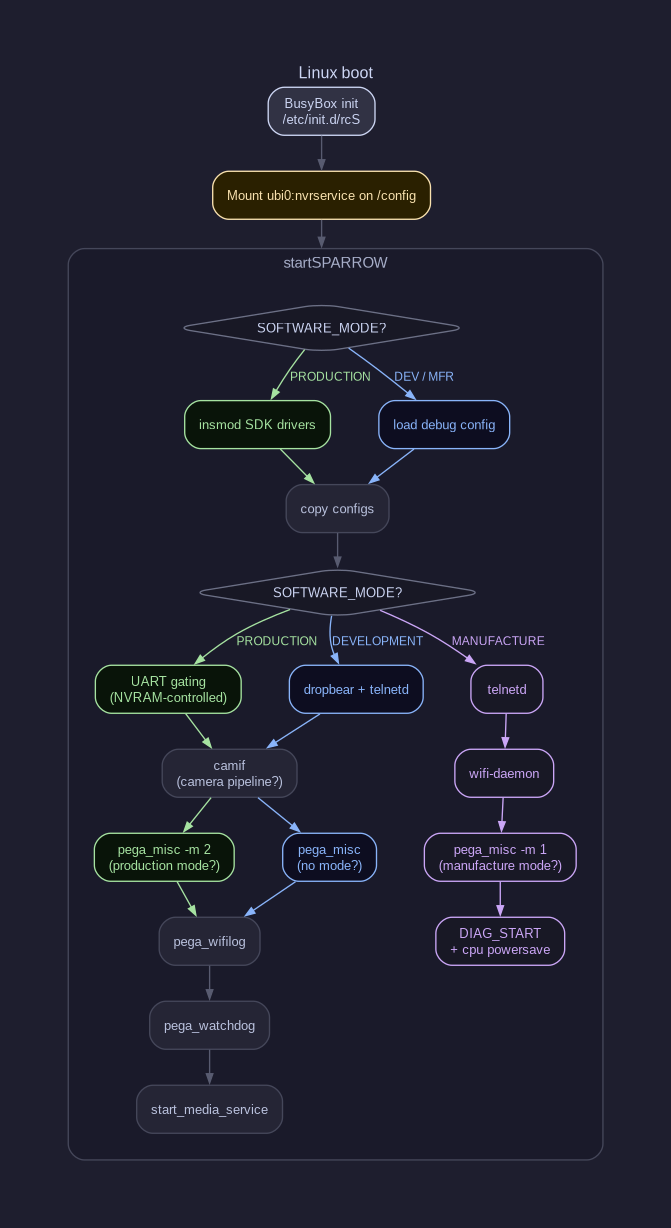
The camera is using Busybox init as its init system. The init script /etc/init.d/rcS is quite simple. It basically set up a few mount points and then calls /etc/init.d/startDB which is a symlink to /etc/init.d/startSPARROW. This is the main init script that starts all the services on the camera.
The most important thing to take away from here is that:
- The script read etc/pega/software_mode to determine what to start up. For example, if it is set to "PRODUCTION", it writes some values to the hardware registers (UART registers as we will see later).
- The UBIFS volume is mounted to /config
 1#!/bin/sh
 2
 3software_mode=`cat /etc/pega/software_mode`
 4if [ "$software_mode" == "PRODUCTION" ]; then
 5	riu_w 0x101e 0x56 0x0100
 6	riu_w 0x101e 0x57 0x0004
 7fi
 8
 9mount -a
10mkdir -p /dev/shm
11
12echo /sbin/mdev > /proc/sys/kernel/hotplug
13
14/sbin/mdev -s
15
16mount -t sysfs none /sys
17mount -t tmpfs mdev /dev
18mount -t debugfs none /sys/kernel/debug/
19mount -t ubifs ubi0:nvrservice /config
20
21mkdir -p /dev/pts
22mount -t devpts devpts /dev/pts
23
24mkdir -p /var/lock
25
26if [ "0" != "0" ]; then
27telnetd -l sh
28fi
29
30sh /etc/init.d/startDB
SDK drivers
If software_mode is set to PRODUCTION, then it will load a bunch of kernel modules from /sdk/modules/:
 1insmod /sdk/modules/4.9.84/grace.ko
 2insmod /sdk/modules/4.9.84/lockd.ko
 3insmod /sdk/modules/4.9.84/ms_notify.ko
 4insmod /sdk/modules/4.9.84/mhal.ko
 5insmod /sdk/modules/4.9.84/mi_common.ko
 6insmod /sdk/modules/4.9.84/mi_sys.ko logBufSize=256
 7insmod /sdk/modules/4.9.84/mi_sensor.ko
 8insmod /sdk/modules/4.9.84/mi_rgn.ko
 9insmod /sdk/modules/4.9.84/mi_ai.ko
10insmod /sdk/modules/4.9.84/mi_vpe.ko
11insmod /sdk/modules/4.9.84/mi_shadow.ko
12insmod /sdk/modules/4.9.84/mi_ao.ko
13insmod /sdk/modules/4.9.84/mi_vif.ko
14insmod /sdk/modules/4.9.84/mi_divp.ko
15insmod /sdk/modules/4.9.84/mi_venc.ko use_ring_ref=0
16insmod /sdk/modules/4.9.84/PS5250_MIPI.ko chmap=1
Copy configs
It checks if /config contains all configuration files needed, if not, it copies the default ones from the read-only squashfs, e.g.:
 1init_audio_config()
 2{
 3	if [ ! -e /config/pega/audio_ai.cfg ]; then
 4		mkdir -p /config/pega
 5		cp /etc/pega/audio_ai.cfg /config/pega/audio_ai.cfg
 6	fi
 7
 8	if [ ! -e /config/pega/audio_ao.cfg ]; then
 9		mkdir -p /config/pega
10		cp /etc/pega/audio_ao.cfg /config/pega/audio_ao.cfg
11	fi
12
13	if [ ! -e /config/pega/audio_aed.cfg ]; then
14		mkdir -p /config/pega
15		cp /etc/pega/audio_aed.cfg /config/pega/audio_aed.cfg
16	fi
17}
But the most intrersting part is actually these:
 1init_sdk()
 2{
 3	if [ ! -L /config/config_tool ]; then
 4		rm -rf /config/config_tool
 5		ln -s /sdk/config_tool /config/config_tool
 6	fi
 7
 8	if [ ! -L /config/dump_config ]; then
 9		rm -rf /config/dump_config
10		ln -s /sdk/config_tool /config/dump_config
11	fi
12
13	if [ ! -L /config/dump_mmap ]; then
14		rm -rf /config/dump_mmap
15		ln -s /sdk/config_tool /config/dump_mmap
16	fi
17
18	if [ ! -L /config/mmap.ini ]; then
19		rm -rf /config/mmap.ini
20		ln -s /sdk/mmap.ini /config/mmap.ini
21	fi
22
23	if [ ! -L /config/modules ]; then
24		rm -rf /config/modules
25		ln -s /sdk/modules /config/modules
26	fi
27
28	if [ ! -L /config/iqfile ] && [ ! -d /config/iqfile ]; then
29		rm -rf /config/iqfile
30		ln -s /sdk/iqfile /config/iqfile
31	fi
32}
It creates symlinks to an executable (!) file on the read-only squashfs!
setup_config
Depending on which mode the camera is built for, it will start different services. E.g. in DEVELOPMENT it will start both SSH and telnetd:
 1setup_config()
 2{
 3	chronyd || ntpd
 4
 5	enable_GPIO
 6
 7	if [ "$SOFTWARE_MODE" == "DEVELOPMENT" ]; then
 8		echo "SOFTWARE_MODE=DEVELOPMENT"
 9
10		#ethernet
11		#init_eth0
12
13		#ssh server
14		dropbear -p 22 -E
15
16		#telnetd turned on before PEGA is able to login the SSH
17		telnetd -l sh
18	fi
19
20	if [ "$SOFTWARE_MODE" == "PRODUCTION" ]; then
21		echo "SOFTWARE_MODE=PRODUCTION"
22
23		# setup UART according to the NVRAM
24		init_UART
25	fi
26
27	if [ "$SOFTWARE_MODE" == "MANUFACTURE" ]; then
28		echo "SOFTWARE_MODE=MANUFACTURE"
29
30		telnetd -l sh
31	fi
32
33	#NOTE sdo: earlier nvram_sync was not able to retrieve items from sku_printenv
34	# redo this fetch_kv call to get the items.
35	pegacmd fetch_kv
36}
In PRODUCTION mode, it only initiate the UART. Let's take a look at that function as well:
 1init_UART()
 2{
 3	enableRX=`nvram get pega_sys_en_uart_rx`
 4	enableTX=`nvram get pega_sys_en_uart_tx`
 5
 6	if [ "$enableRX" == "1" ]; then
 7		riu_w 0x101e 0x57 0x0000
 8	fi
 9
10	if [ "$enableTX" == "1" ]; then
11		riu_w 0x101e 0x56 0x0000
12	fi
13}
nvram is actually a shell script that read and write values from the UBI volume:
 1
 2#!/bin/sh
 3
 4nvram_repo="/config/nvram"
 5
 6nvram_show () {
 7    files="$(ls $nvram_repo)"
 8    for f in $files; do
 9        echo "$f=$(cat $nvram_repo/$f)"
10    done
11}
12
13nvram_get () {
14    if [ -f $nvram_repo/$1 ]; then
15        echo "$(cat $nvram_repo/$1)"
16    fi
17}
18
19nvram_set () {
20    check=$(echo $1 | grep "=")
21    if [ ! -z "$check" ]; then
22        i=$(echo $1 | cut -f1 -d"=")
23        v=$(echo "$1" | cut -f2- -d=)
24        echo "$v" > $nvram_repo/$i
25    fi
26}
27
28nvram_unset () {
29    if [ -f $nvram_repo/$1 ]; then
30        rm $nvram_repo/$1
31    fi
32}
33
34print_usage () {
35    echo "usage: nvram show"
36    echo "       nvram get <item>"
37    echo "       nvram set <item>=<value>"
38    echo "       nvram unset <item>=<value>"
39}
40
41if [ -z "$1" ]; then
42    print_usage
43    exit
44fi
45
46case "$1" in
47    show) nvram_show
48        ;;
49    get|set|unset)
50        if [ -z "$2" ]; then
51            print_usage
52        else
53            nvram_$1 $2
54        fi
55        ;;
56    commit)
57        sync
58        ;;
59    )  echo "unknown argument $1"
60        print_usage
61        ;;
62esac
In other words, pega_sys_en_uart_rx and pega_sys_en_uart_tx are just nvram flags that control whether UART RX and TX are enabled. These flags are located in the writeable UBI config volume!
Also, riu_w 0x101e 0x56 and riu_w 0x101e 0x57 were the same registers that were written to earlier, probably to have the UART disabled by defaultl
The arlo_ssh flag
Inside the same init script there is another check:
Setting arlo_ssh=1 in the writable UBI nvram enables IP forwarding. I found no other reference to this flag, maybe it is only used in other products.
Summary
To summarize what we have learned in this part:
- The software mode depends on the content in /etc/pega/sofware_mode
- The nvrservice UBI volume is mounted very early, before any services are started
- A bunch of kernel moduels are loaded during initialization
- The init scripts checks if the nvrservice volume contains all the configuration files, if not, it copy default files from the read-only squashfs
- The init script creates symlinks to an executable file on the read-only squashfs, which is quite interesting
- SSH and telnetd are only started in DEVELOPMENT mode, while in PRODUCTION mode only the UART is initiated
- The UART lines are controlled by nvram flags, which are located in the writeable UBI config volume
In Part4, we will do a deeper analysis of the system and try to find some vulnerabilities.