Rooting a VMC2040 security camera part 5: What didn't work
Brief
In this part I will write down the things I tried that didn't work.
The other parts of the series are:
U-Boot Environment
The first thing I tried was to modify the U-Boot environment variables as those were not verified against any signature.
I made the following modifications:
bootdelay=3
bootargs=init=/bin/sh ....
In hope that I could either break U-boot during the boot sequence or boot straight into a root shell.
I saved the variables into a file and created a new set of environment:
1mkenvimage -s 0x20000 -o env_block.bin env.txtAnd wrote it back to the image:
1dd if=env_block.bin of=nand.img bs=1 seek=$((0x22000)) conv=notruncResult
It didn't work. No countdown on boot nor shell. Instead I got this output on the UART:
new bootargs =
[ubi.mtd=11,2048 root=/dev/mtdblock10 rootfstype=squashfs ro init=/linuxrc LX_MEM=0xffc6000 mma_heap=mma_heap_name0,miu=0,sz=0x2600000 mma_memblock_remove=1 mtdparts=nand0:0xC0000@0x140000(IPL0),0xC0000(IPL_CUST0),0xC0000(UBOOT0),0xC0000(UBOOT1),0x140000(ENV),0x140000(ENV_P1),0xC0000(MANUFACTURE),0x5C0000(KERNEL),0x5C0000(KERNEL_P1),0x1E00000(ROOTFS),0x1E00000(ROOTFS_P1),-(UBI)]
Appearently, the bootargs are being overidden at runtime during the boot sequence.
Crack root password
As stated in a previous part, the password string from /etc/passwd is:
root:$5$rounds=999999$3y7Gr3/skKaK$//m/9T7NLLgTyGWnxt17LuYR5CcS28/w.pqUzt70dfD:0:0:root:/home:/bin/sh
We know that the hash type is SHA-512 ($5$) with 999,999 rounds. The salt is 3y7Gr3/skKaK and the hash is //m/9T7NLLgTyGWnxt17LuYR5CcS28/w.pqUzt70dfD.
That is not a trivial combination to crack, but I gave it a try. I usually use John the Ripper [1] for password cracking, but I have used hashcat [2] recently.
I very rarely do a real brute force attack because it takes too long, so I go for a dictionary attack using the rockyou wordlist [3] , which contains ~14 million common passwords.
1echo 'root:$5$rounds=999999$3y7Gr3/skKaK$//m/9T7NLLgTyGWnxt17LuYR5CcS28/w.pqUzt70dfD:0:0:root:/home:/bin/sh' > arlo_passwd
2hashcat -m 7400 -a 0 arlo_passwd rockyou.txt
Several (~6) hours later the password was still not cracked so I gave up.
UBI
Next step was to modify the writable UBIFS volume that mounts at /config. This is where all the configuration files are stored, including the debug flags that enable RX UART.
Modify the UBI volume
To modify the UBI volume, I needed to create a new UBI image with the modified content. The steps were:
Create the configuration file
Create a file called ubinize.cfg:
1   [nvrservice]
2   mode=ubi
3   image=ubifs.img
4   vol_id=0
5   vol_type=dynamic
6   vol_name=nvrservice
7   vol_alignment=1
8 vol_size=49152000- vol_name must be nvrservice — that is the name the init scripts use when they call ubiattach.
- vol_size sets the volume to the full usable partition space.
Create the UBI image
1   ubinize \
2       --peb-size=131072 \
3       --min-io-size=2048 \
4       --sub-page-size=2048 \
5       --vid-hdr-offset=2048 \
6       --output=nvrservice.ubi \
7       ubinize.cfg
nvrservice.ubi is then ready to be written to the NAND flash.
pega_sys_en_uart_rx
pega_sys_en_uart_rx were checked in the startSPARROW init script, and RX is obviously disabled by default, so lets enable it!
1 echo "1" > extracted_ubi/pega/pega_sys_en_uart_rxResult
The SoC still dosen't recieve anything on the RX line. The line seems to be strongly pulled up. I don't see any external components that could cause this, the trace seems to only go to the SoC.
Change to development image
/config/nvram/vz_update_url contains the URL to the update server:
1 export vz_update_url=https://updates.arlo.com/arlo/fw/fw_deployed/productionSo lets change it to the dev branch.
Result
I successfully modified /config/nvram/vz_update_url in the UBI volume to point to the dev branch, then triggered a factory reset (which causes the camera to check for updates during re-registration). The vzdaemon logs confirmed the change:
vzdaemon configuration:
LogLevel                  = INFO
BackendUrl                = https://deviceapi.messaging.arlo.com
CameraInputIx             = lo
CameraInputPort           = 4050
DoorbellInputPort         = 4150
PresenceIx                = lo
PresenceDataPort          = 4001
PresenceStatusPort        = 4002
HttpServerPort            = 80
UpdateUrl                 = https://updates.arlo.com/arlo/fw/fw_deployed/dev
MetricUrl                 = https://mcs.arlo.com?r=
SerialNum                 = A4U222KA0005C
ConfigPath                = /tmp/media/nand/config/arlo/vzdaemon/conf
WatchdogPid               = 1191
HwRevision                = 1.2
ModelId                   = VMC2040A
CertPath                  = /certs/ca-bundle-arlo.crt
MediaServerCertPath       = /certs/wowza.netgear.com_Certificate_Only.pem
RtspPort                  = -1
AcsdStatusPort            = 4006
Version                   = 1.22.0.0_33_53d2844_f5c0b43
Platform                  = VMC2040
The camera fetched the dev update rules and found firmwares — but not for hardware revision 1.2. My specific hardware variant was not in the dev build targets so the update did not apply.
Sad. This will probably work for other cameras though.
I cannot redirect the update URL to my own server due to HTTPS.
The ffserver configuration
The ffserver configuration file is located at /config/rtspserver.conf. So at least I should be able to expose the stream to my network? I changed the BindAdress to 0.0.0.0:
Port 8090
RTSPPort 554
BindAddress 127.0.0.1     <= Change to 0.0.0.0
IPFilter 127.0.0.1
MaxHTTPConnections 20
MaxClients 10
<Stream live>
Format rtp
VideoSize 1280x720
VideoBitRate 768000
VideoFrameRate 24
...
I also had to add "ACL allow" in the Stream section as well, otherwise the stream is blocked by ffserver's internal ACL rules:
<Stream live.sdp>
Format rtp
Feed feed1.ffm

ACL allow 0.0.0.0 255.255.255.255
</Stream>
Result
Nope. The stream still binds to localhost only. When I disassembled fflauncher, the binary that launches ffserver, I found that is probably overwrite the configuration file at runtime with hardcoded values.
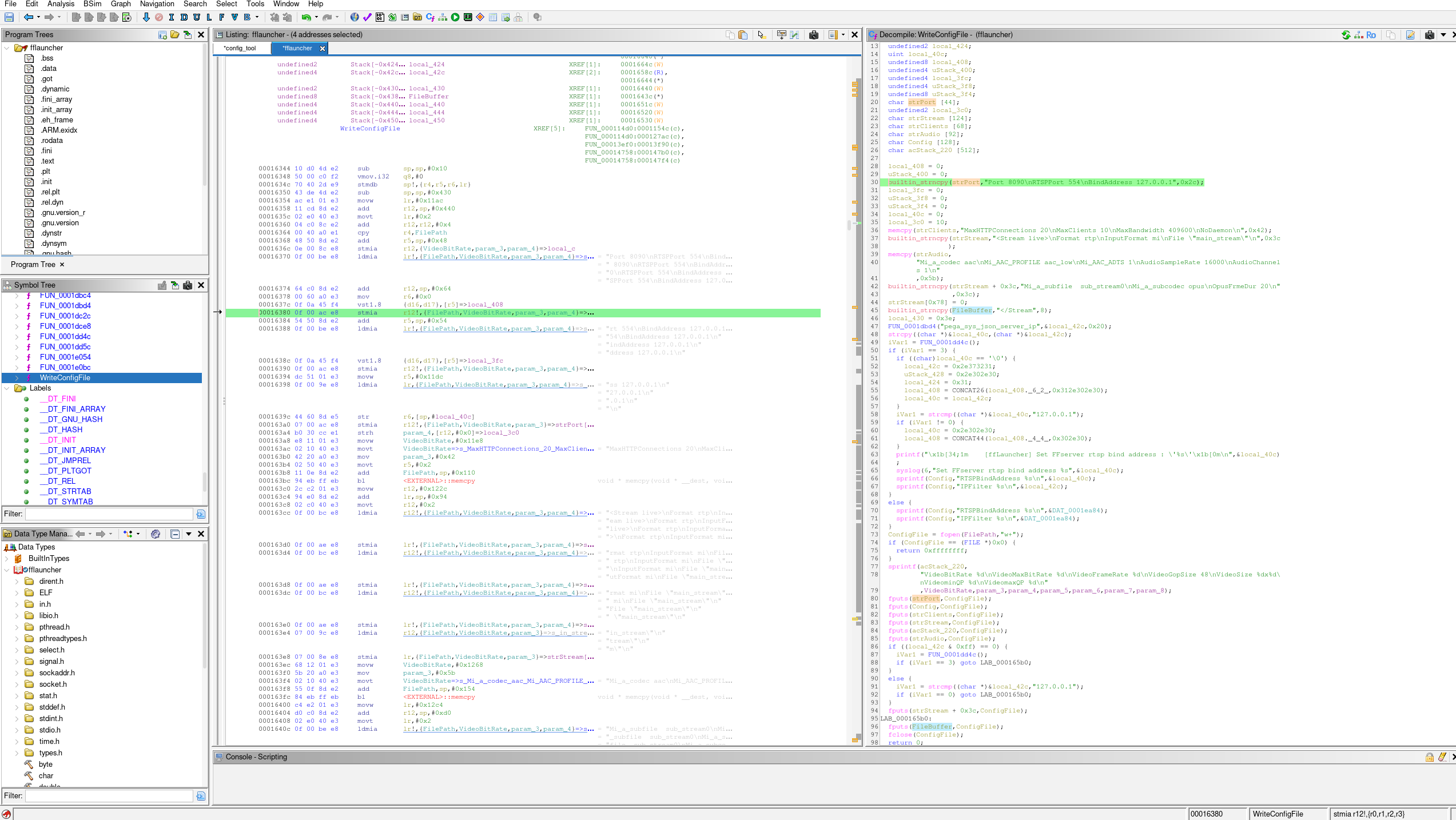
It also explains why the file seems to be unmodified when I read it back from the NAND flash.
Summary
No success in this part. But in Part6, I will show what actually worked and how I got there.
| [1] | https://en.wikipedia.org/wiki/John_the_Ripper |
| [2] | https://github.com/hashcat/hashcat |
| [3] | https://github.com/RykerWilder/rockyou.txt |